
Download TweakNow PowerPack – optimize, customize, system performance, Windows, registry cleaner, virtual desktop, browser settings
Overview
TweakNow PowerPack is a comprehensive utility suite designed to enhance and customize the Windows operating system and web browsing experience. Targeted at users seeking deeper control over their digital environment, the app offers tools to optimize system performance, access hidden configurations, and streamline productivity workflows. It serves individuals and professionals who want to fine-tune their computing setup beyond default settings, whether for improved speed, privacy, or workspace organization.
The app addresses common pain points such as system slowdowns, cluttered desktops, and limited browser customization. By providing a centralized interface for multiple system-level adjustments, TweakNow PowerPack reduces the need to navigate complex registry edits or third-party tools. Real-world use cases include preparing a work machine for high-efficiency tasks, securing browsing activity, or organizing multiple projects across distinct virtual desktops.
Developed by TweakNow, the app is positioned as a utility tool within the Windows ecosystem, catering to users who value customization and performance. While the developer did not provide additional technical details about their background or development philosophy, the app’s modular structure suggests a focus on user empowerment through accessible system-level control. Its presence underscores the ongoing demand for tools that bridge the gap between default system behavior and advanced user preferences.
Key Features & Functionality
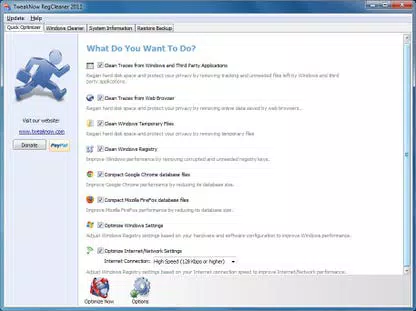
- Registry Cleaner for System Optimization – This module scans and removes invalid or redundant entries from the Windows Registry, aiming to improve system stability and responsiveness. Users can perform safe cleanups without manually editing system files, reducing the risk of configuration errors.
- Windows Secret Section for Hidden Settings – Access to over 100 advanced Windows settings typically hidden from standard user interfaces. These include visual effects, keyboard shortcuts, and system behaviors, allowing users to tailor their OS experience precisely.
- Virtual Desktop for Enhanced Productivity – Enables the creation and management of up to four separate desktop environments. Each can be customized with distinct layouts, applications, and themes, facilitating task separation and reducing digital clutter.
- Browser Fine-Tuning Capabilities – Offers tools to adjust browser-specific settings such as cache management, privacy controls, and feature disabling. This helps users enhance browsing speed, reduce tracking, and maintain a cleaner browsing session.
These features are particularly beneficial in professional or multi-tasking environments. For example, a graphic designer might use virtual desktops to isolate design tools from communication apps, while a developer could leverage the registry cleaner to resolve startup delays. The browser settings module supports privacy-conscious users seeking to minimize data retention across sessions.
Interface, UX & Performance
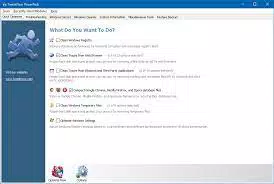
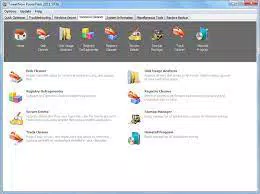
The interface of TweakNow PowerPack is structured around a modular dashboard, presenting each tool in a clearly labeled section. Navigation is linear and intuitive, with consistent layout patterns across modules. Visual design is functional, favoring clarity over ornamentation, which aligns with its utility-focused purpose.
Users can access each feature through a central menu, with minimal onboarding required. The app responds promptly to user inputs, suggesting efficient processing and stable operation. Although the developer did not list formal performance metrics, the lightweight file size of 4.8 MB indicates a low system footprint, which supports smooth operation on a range of Windows devices.
Responsiveness across different device categories—such as desktops, laptops, and older systems—was not formally disclosed. However, the app’s compact size and targeted functionality suggest broad compatibility with standard Windows hardware. Stability appears to be a priority, as the app avoids intrusive pop-ups or background processes that could disrupt workflow.
Platform Compatibility & Technical Requirements
TweakNow PowerPack is designed exclusively for the Windows platform. The app requires a compatible Windows operating system, though specific minimum OS versions were not listed by the developer. Given its functionality, it is likely optimized for Windows 10 and Windows 11, but users should verify compatibility with their system.
The application size is 4.8 MB, making it a lightweight download suitable for users with limited storage or slower internet connections. The latest version, 2.0.0, was released on January 15, 2024. The app is available for purchase at a one-time price of $29.95, positioning it as a premium utility tool rather than a free or subscription-based service.
Pros and Cons
Pros
- Centralized access to advanced system and browser settings
- Safe registry cleaning without requiring technical expertise
- Support for up to four customizable virtual desktops
- Compact file size with minimal system impact
- One-time purchase model with no recurring fees
Cons
- Specific OS compatibility details were not disclosed
- No information on automatic update mechanisms
- Price point may be considered high for casual users
- Limited public documentation on security protocols
- Not available on non-Windows platforms
FAQ
Is TweakNow PowerPack safe to use?
The app includes a registry cleaner designed to remove invalid entries safely. However, users should exercise caution when modifying system settings and ensure they understand the implications of each change.
Can I use TweakNow PowerPack on older Windows versions?
Compatibility with older Windows systems was not specified. The developer did not provide detailed requirements, so users should test the app on their specific system before installation.
Does TweakNow PowerPack update automatically?
The developer did not disclose information about automatic update functionality. Users may need to manually check for new versions.
Is the app available for Mac or Linux?
Currently, TweakNow PowerPack is only available for Windows. There is no official support for macOS or Linux platforms.
Can I uninstall TweakNow PowerPack without affecting my system?
As a utility tool, TweakNow PowerPack does not modify core system files permanently. Uninstallation should not leave behind critical changes, but users are advised to back up settings before removal.
Final Thoughts
TweakNow PowerPack stands out as a powerful, all-in-one solution for users who want to take full control of their Windows environment. With its combination of registry optimization, hidden setting access, virtual desktop management, and browser customization, it delivers tangible benefits for productivity and system performance. While the price may deter casual users, professionals, power users, and IT administrators will find significant value in its capabilities.
Its lightweight design, modular structure, and clear interface make it accessible even to those with limited technical experience. For anyone seeking to unlock hidden potential in their Windows system, TweakNow PowerPack offers a reliable and efficient path forward.
Download TweakNow PowerPack now


